











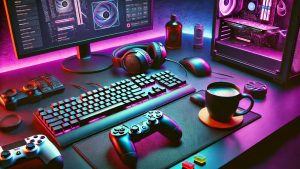
Gaming accessories benefits go far beyond simple aesthetics. While many gamers focus on buying a powerful gaming PC, the accessories connected to that system play a major role in determining overall performance, comfort, and enjoyment.
A complete gaming setup includes more than just processing power. Devices such as gaming mice, mechanical keyboards, gaming headsets, high-refresh-rate monitors, and ergonomic chairs help players perform better and stay comfortable during long gaming sessions.
Whether you are a casual gamer or a competitive player, understanding gaming gear benefits can help you build a more effective setup.
Why Gaming Accessories Matter
Modern games require precision, speed, and awareness. Without proper equipment, players may struggle to reach their full potential.
Quality accessories help improve:
- Accuracy
- Response speed
- Communication
- Comfort
- Immersion
Even the most expensive gaming PC cannot deliver the best experience if paired with poor-quality peripherals.
Gaming Mouse Benefits
A gaming mouse is one of the most important parts of any gaming setup.
Advantages of a Gaming Mouse
- Faster tracking
- Adjustable DPI settings
- Better precision
- Customizable buttons
- Improved responsiveness
In competitive games such as FPS titles, precise aiming can make a major difference.
Players using gaming mice often experience smoother movement and better control compared to standard office mice.
Mechanical Keyboard Advantages
Mechanical keyboards remain one of the most popular accessories among gamers.
Key Benefits
- Faster key registration
- Better durability
- Tactile feedback
- Improved typing experience
- Enhanced gaming performance
Many esports players prefer mechanical keyboards because they provide reliable performance under heavy use.
Different switch types also allow users to choose a keyboard that matches their personal preferences.
Gaming Headset Benefits
Audio plays a major role in competitive gaming.
A quality gaming headset helps players detect sounds that can influence gameplay decisions.
Advantages Include
- Clear communication
- Better directional audio
- Enhanced immersion
- Noise isolation
- Improved teamwork
Hearing footsteps, reload sounds, and environmental cues can provide a significant advantage during matches.
High Refresh Rate Monitor Benefits
A gaming monitor affects how smoothly games appear on screen.
Benefits of High Refresh Rate Displays
- Smoother gameplay
- Reduced motion blur
- Better visual clarity
- Faster reaction times
- Improved competitive performance
Monitors with refresh rates of 144Hz or higher are often recommended for serious gamers.
The difference between standard displays and gaming monitors becomes noticeable during fast-paced gameplay.
Gaming Chair Benefits
Many gamers underestimate the importance of seating comfort.
Long gaming sessions can place stress on the body if proper support is not available.
Benefits of an Ergonomic Gaming Chair
- Better posture
- Reduced back pain
- Improved neck support
- Increased comfort
- Better focus during gameplay
A comfortable chair helps players maintain concentration for longer periods.
How Accessories Improve Performance

The right equipment can directly impact gaming results.
Faster Input Response
Gaming keyboards and mice are designed to reduce delays between user actions and in-game responses.
Better Precision
Advanced sensors improve aiming accuracy and cursor control.
Improved Awareness
Quality audio equipment helps identify important sounds quickly.
Enhanced Visual Experience
Gaming monitors provide smoother visuals and improved motion handling.
Together, these improvements contribute to a better gaming experience.
How Accessories Improve Comfort
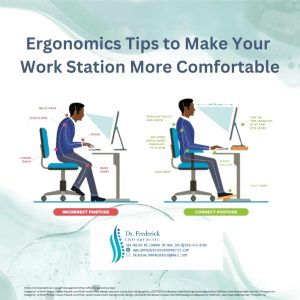
Comfort plays an important role in maintaining performance.
Poor ergonomics can lead to:
- Wrist strain
- Neck pain
- Back discomfort
- Fatigue
Proper gaming equipment helps reduce these issues and allows gamers to play comfortably for longer periods.
Comfortable Setup Essentials
- Ergonomic chair
- Large mouse pad
- Adjustable monitor position
- Supportive desk
- Comfortable headset
A well-designed setup promotes better health and productivity.
Accessories for Competitive Gamers
Competitive players often invest in premium equipment because small advantages matter.
Important accessories include:
- High-DPI gaming mouse
- Mechanical keyboard
- 144Hz or 240Hz monitor
- Low-latency headset
- Ergonomic chair
These tools help maximize performance during competitive matches.
Accessories for Casual Gamers
Casual gamers may focus more on comfort and convenience.
Popular choices include:
- Wireless gaming mice
- Comfortable headsets
- Mid-range gaming keyboards
- Adjustable desks
- Large displays
These accessories create an enjoyable gaming environment without requiring a professional-level budget.
Choosing the Right Gaming Devices
Before purchasing new equipment, consider:
Gaming Style
Different games require different accessories.
Budget
Focus on products that provide the best value.
Compatibility
Gaming accessories benefits work properly with your gaming system.
Comfort
Choose equipment that supports long gaming sessions.
Build Quality
Durable products often provide better long-term value.
Future of Gaming Accessories
Gaming accessories benefits continue to evolve rapidly.
Future innovations may include:
- AI-powered audio enhancements
- Improved wireless technology
- Better ergonomic designs
- Advanced sensor technology
- Smarter customization features
These developments will continue improving gaming experiences for players worldwide.
Final Thoughts
gaming accessories benefits extend far beyond appearance. The right equipment can improve accuracy, communication, comfort, and overall gameplay. Whether you are upgrading a gaming mouse, keyboard, headset, monitor, or chair, investing in quality accessories helps create a more enjoyable and competitive gaming experience.
For gamers looking to maximize performance in 2026, choosing the right accessories remains one of the smartest upgrades available.