











Best Student Gaming Laptop Overview
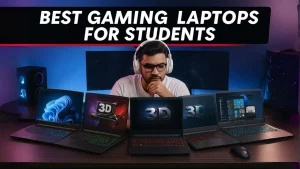
A best student gaming laptop should provide the perfect balance between productivity, portability, battery life, and gaming performance. Modern students need a device that can handle classes, assignments, research, presentations, and entertainment without requiring multiple devices.
The good news is that today’s laptops are more powerful than ever. A well-chosen student gaming laptop can help you complete academic tasks during the day and enjoy smooth gaming performance in the evening. Whether you are attending online classes, editing videos, programming, or playing modern games, the right laptop can support all your needs.
Choosing the best student gaming laptop requires understanding the key components that affect both productivity and gaming performance.
Why Students Need an All-Rounder Laptop

Students often have limited budgets and cannot afford separate devices for study and gaming. An all-rounder laptop solves this problem by combining efficiency and performance in a single machine.
Benefits include:
- Easy portability
- Strong battery life
- Reliable gaming performance
- Efficient multitasking
- Long-term value
Instead of carrying multiple devices, students can use one laptop for academic work, content creation, communication, and gaming.
Performance Requirements for Study and Gaming
Performance is one of the most important factors when selecting a student gaming laptop.
Modern students often use:
- Microsoft Office
- Google Workspace
- Zoom and Teams
- Coding software
- Design applications
- Video editing tools
At the same time, many students want to enjoy popular games after classes.
A laptop that combines productivity and gaming performance should have enough power to handle both workloads efficiently.
Choosing the Right CPU and GPU
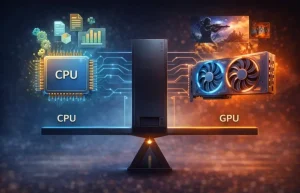
The processor and graphics card are the most important hardware components.
Recommended Processors
Students should consider:
- Intel Core i5
- Intel Core i7
- AMD Ryzen 5
- AMD Ryzen 7
These processors provide excellent multitasking capabilities while maintaining good battery efficiency.
Recommended Graphics Cards
For gaming, dedicated graphics cards are highly recommended.
Good options include:
- NVIDIA RTX 3050
- NVIDIA RTX 4050
- NVIDIA RTX 4060
A dedicated GPU improves gaming performance, creative workloads, and graphical applications.
RAM and Storage Recommendations
Memory and storage directly impact system responsiveness.
RAM
For 2026, 16GB RAM is recommended because it allows:
- Smooth multitasking
- Better gaming performance
- Faster application switching
- Improved productivity
Storage
SSD storage is essential.
Recommended capacity:
- 512GB SSD minimum
- 1TB SSD for gamers
Benefits include:
- Faster boot times
- Quick file transfers
- Reduced game loading times
- Better overall performance
Display Quality Matters
The display affects both productivity and gaming experiences.
Resolution
A Full HD display remains the ideal choice for most students.
Benefits:
- Sharp visuals
- Lower battery consumption
- Better gaming performance
Refresh Rate
A higher refresh rate improves gaming smoothness.
Recommended options:
- 120Hz
- 144Hz
- 165Hz
Higher refresh rates provide smoother motion and better responsiveness.
Battery Life and Portability

Students spend significant time moving between classrooms, libraries, and study areas.
A good student gaming laptop should offer:
- Lightweight design
- Durable construction
- Long battery life
Why Battery Life Matters
Strong battery performance allows students to:
- Attend classes
- Complete assignments
- Join online meetings
- Study without carrying chargers everywhere
A laptop with 8–12 hours of battery life is usually sufficient for most students.
Keyboard and Build Quality
The keyboard is often overlooked but plays a major role in productivity.
Important features include:
- Backlit keyboard
- Comfortable key travel
- Durable construction
- Responsive typing experience
Students who spend hours typing assignments and reports will benefit from a comfortable keyboard.
Connectivity and Ports
A modern student gaming laptop should include:
- USB-C ports
- USB-A ports
- HDMI output
- Wi-Fi 6 support
- Bluetooth connectivity
These features improve compatibility with external devices and future technologies.
Cooling Performance
Gaming generates heat, making cooling systems extremely important.
A quality cooling system provides:
- Stable gaming performance
- Reduced thermal throttling
- Longer hardware lifespan
- Better user comfort
Efficient cooling allows students to enjoy gaming sessions without performance drops.
Future-Proofing Your Laptop
Buying a laptop is a long-term investment.
Features that improve longevity include:
- Upgradeable RAM
- Expandable storage
- Modern processors
- Dedicated graphics cards
- Strong cooling systems
A future-proof laptop can remain useful for several years without requiring replacement.
Common Mistakes Students Should Avoid
Many buyers make purchasing decisions based only on price.
Avoid:
- Low RAM configurations
- Slow storage drives
- Weak cooling systems
- Low-quality displays
Spending slightly more on better specifications often results in greater long-term value.
Best Features to Look For in 2026
The best student gaming laptop should include:
- Intel Core i5/i7 or Ryzen 5/7
- RTX 3050, RTX 4050, or RTX 4060
- 16GB RAM
- 512GB SSD or larger
- 120Hz or 144Hz display
- Good battery life
- Efficient cooling system
These specifications provide an excellent balance between productivity and gaming.
Final Thoughts
Choosing the best student gaming laptop in 2026 requires balancing study requirements, gaming performance, portability, and long-term value. A laptop with a modern processor, dedicated graphics card, sufficient RAM, SSD storage, and good battery life can easily handle academic workloads during the day and gaming sessions at night.
For students looking for a single device that delivers both productivity and entertainment, investing in a well-balanced student gaming laptop is one of the smartest technology decisions you can make.